
TABLE OF CONTENTS
Data center structured cabling is a planned fiber and copper plant: permanent trunks run between fixed distribution areas and patch panels, and equipment connects to those panels with short patch cords. The alternative is point-to-point cabling, sometimes called unstructured cabling, with a separate cable for every link. In an AI cluster the choice matters more than usual, because a single GPU server can have eight or more high-speed network ports, and each port runs over several fibers in an MPO connector.
Below we map the standard distribution areas onto a GPU data hall, show how to estimate fiber counts from your own topology, work out how much of the loss budget each patch panel uses, and end with a list of what to decide before ordering trunks.
What Is Data Center Structured Cabling?
A structured cabling system divides the room into areas with fixed roles. Backbone cabling links the distribution areas to each other, horizontal cabling runs from a distribution area to the equipment racks, and patch panels at each end give every fiber a fixed, labeled position. When equipment moves or a link changes, people re-patch at the panel instead of pulling a new cable through the pathways, which keeps changes quick and limits downtime. The cabling infrastructure also stays in place while switches and optics change from one generation to the next, and that is where its scalability comes from.
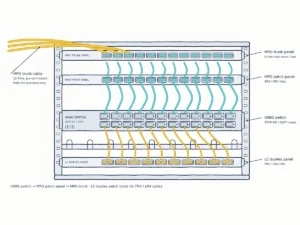
Equipment meets the cabling in one of two ways. An interconnect is a patch panel next to the active equipment that distributes its ports to the rest of the room. A cross-connect adds a separate set of panels that mirror the equipment ports, so any port can be patched to any other port at the front of the panels.[1]
The distribution areas below come from the industry standards for data center cabling. The right-hand column is our applied reading for a GPU data hall, not a definition from the standard.
| Area | Role in the cabling layout | Typical contents in an AI cluster (applied reading) |
|---|---|---|
| Main distribution area (MDA) | Main cross-connect for the room | Spine switches and the main fiber cross-connect |
| Intermediate distribution area (IDA) | Optional level between the MDA and the HDAs in larger sites | A cross-connect for one hall or pod |
| Horizontal distribution area (HDA) | Serves one zone or row of racks | Leaf switches, or the panels that feed one row of GPU racks |
| Equipment distribution area (EDA) | Racks and cabinets for end equipment | GPU servers and storage nodes |

The 2024 revision of the US standard added a requirement for cabinets at least 800 mm wide in the MDA, IDA and HDA, and at the equipment outlet it still specifies only LC and MPO connectors for optical fiber.[2]
Data Center Cabling Standards
| Region | Standard | What it covers |
|---|---|---|
| United States | ANSI/TIA-942-C (May 2024) | Telecommunications infrastructure for data centers and computer rooms[3] |
| International | ISO/IEC 11801-5:2017 | Generic cabling for data centres; it replaced ISO/IEC 24764:2010[4] |
| Europe | EN 50173-5:2018 | Generic cabling systems for data centre spaces[5] |
| Fiber components (US) | ANSI/TIA-568.3-E (September 2022) | Optical fiber cabling and components[6] |
Several cabling guides still list ISO/IEC 24764 as the international data center standard. It was withdrawn and replaced by ISO/IEC 11801-5:2017, so specifications written today should cite the newer number.[4]
What Changes When the Data Center Runs AI Workloads
An AI cluster follows the same cabling structure as any modern data center. What changes is the number of links, the fiber count per link and how short the links are. Each port’s bandwidth is split across several fibers working in parallel, so faster ports often need more fibers.
- More than one network. NVIDIA’s DGX SuperPOD reference architecture separates a compute fabric, a storage fabric, an in-band management network and an out-of-band management network.[7] Each carries different data traffic and needs its own cabling plan, and the compute fabric is by far the largest.
- More ports per server. A DGX H100 has four OSFP cages serving eight single-port ConnectX-7 cards, each running InfiniBand at up to 400 Gb/s by default.[8] In the SuperPOD design, servers are grouped 32 at a time and each GPU rail is one hop from the same rail on the other 31 nodes.[7] Our GPU networking guide explains the rail layout.
- Parallel optics. A 400GBASE-DR4 link runs over 8 single-mode fibers.[9] 400GBASE-SR8 uses 16 multimode fibers[10] and 800GBASE-DR8 uses 16 single-mode fibers.[11] All of these terminate in MPO connectors, so the trunk fiber count has to match the optic, not just the port count.
- Short distances. In NVIDIA’s DGX SuperPOD H100 data center design, the total cable path of any InfiniBand cable must not exceed 50 m.[12] That limit belongs to one reference design, but it shows how tightly AI racks are planned around cable length.

Structured Cabling vs Point-to-Point Links in a GPU Cluster
Neither approach is mandatory for the whole cluster. One cabling manufacturer notes that both back-end and front-end AI networks may use point-to-point or structured cabling architectures, depending on the design and scale of the facility.[13] A test-equipment maker takes a firmer line: point-to-point cabling is typically used only inside one rack, for example from a top-of-rack switch to the servers below, and is not recommended between cabinets or functional spaces.[1] A common pattern uses both: direct links inside the rack, structured cabling between racks and rows.
| Link | Common approach | Why | What to watch |
|---|---|---|---|
| Server to switch in the same rack | Direct-attach copper cables (DAC) or active optical cables (AOC) | Shortest path, no panel needed | Cable bulk and airflow at the rack |
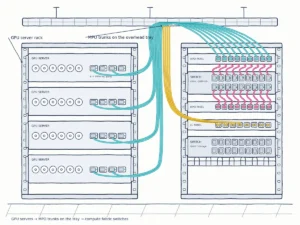
| GPU rack to leaf switches in the same row | MPO patch cords through a panel in each rack, or direct optical cables | Depends on how often the row will be re-cabled | Each panel adds a mated connector pair |
| Leaf to spine, row to row, hall to hall | Trunks between panels in the distribution areas | Long, permanent runs; changes are made at the panel | Fiber count, polarity, loss budget |
| Storage and management networks | Structured cabling | Long-lived links with regular moves and changes | Labels and records |
Patch panels are not an exception in AI links. The 100 m reach of one NVIDIA twin-port single-mode transceiver assumes two optical patch panels in the link.[14] Latency is not a reason to avoid them either: over the short runs inside a pod (under 50 m), light propagation delay stays below 250 nanoseconds, which is negligible next to switching and signal-processing delay.[15]
The real cost of a cross-connect is optical. It places more connection points, and therefore more insertion loss, into the channel, in exchange for isolating active equipment and making moves, adds and changes easier.[1] The next sections show how to size that cost.
How Many Fibers Does an AI Cluster Need?
There is no reliable rule of thumb such as “ten times a normal data center.” The fiber count follows from the topology, so count it from your own design:
Fiber count formula
Fibers = (servers × fabric ports per server × fibers per port) + (switch-to-switch links × fibers per link) + storage, in-band and out-of-band management links + spare capacity for growth.
A worked example: a DGX H100 has eight 400G compute ports.[8] If each port uses a DR4-type optic with eight active fibers, one server needs 64 fibers, and a group of 32 servers needs 2,048 fibers just to reach the leaf switches. The MPO-12 connector on these optics uses four transmit and four receive fibers and leaves four positions blank.[16] A 16-fiber optic such as SR8 or DR8 needs 16 fibers per port, so decide trunk fiber count and connector type together.[10][11]
| GPUs | Scalable units | Compute-to-leaf cables | Switch-to-switch cables |
|---|---|---|---|
| 144 | 2 | 288 | 288 |
| 288 | 4 | 576 | 576 |
| 576 | 8 | 1,152 | 1,152 |
Every Patch Panel Uses Part of the Loss Budget
Each patch panel in a channel adds a mated connector pair. A channel with an interconnect at each end has two connections, adding a cross-connect makes three, and interconnects at both ends plus a cross-connect in between make four.[1]
Parallel optics leave little room for that. A 400GBASE-DR4 channel allows 3.0 dB of insertion loss, and its maximum reach is calculated with 2.75 dB allocated to connections and splices.[9] A 400GBASE-SR8 channel over OM4 multimode fiber allows only 1.9 dB in total.[10] TIA-568 cabling standards set 0.75 dB as the maximum loss for each mated connector pair.[20] Here is what happens if every pair is at that ceiling:
| Channel | Mated pairs | Connection loss at 0.75 dB per pair | Against DR4 (2.75 dB allocated) | Against SR8 on OM4 (1.9 dB channel) |
|---|---|---|---|---|
| Two interconnects | 2 | 1.5 dB | Fits | Leaves 0.4 dB for fiber |
| Interconnect + cross-connect | 3 | 2.25 dB | Fits | Exceeds |
| Two interconnects + cross-connect | 4 | 3.0 dB | Exceeds | Exceeds |

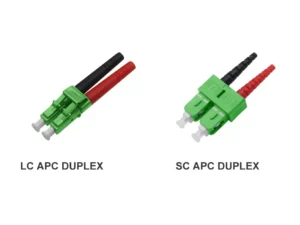
The 0.75 dB figure is a ceiling, not a typical value. The point is that the number of panels is a design decision with an optical price. Count every mated pair, use connectors whose specified loss is well below the ceiling, and measure each link at acceptance. Keep the end face consistent as well: APC and UPC connectors should not be mated. The 400G network guide gives the budget for each 400G optic.
MPO Polarity: Choose One Method Before You Order
Polarity decides whether each transmit fiber reaches a receive fiber at the far end. Method A uses straight-through trunks, Method B uses reversed trunks with the same patch cord type at both ends, and Method C flips adjacent pairs, which is why it is not recommended for parallel optics.[21] Pick one method for the whole channel during design: pre-terminated MPO assemblies are typically made to order and often cannot be returned.[21] For direct optic-to-optic links, NVIDIA supplies straight crossover, type-B MPO-12/APC cables.[16] Our MPO connector guide explains each method with diagrams, and the guide on how to specify MPO/MTP patch cords shows how to write polarity into an order.
Pathways, Density and Data Center Cable Management
Data center cable management for fiber comes down to four things: protecting the bend radius, keeping clear routing paths, leaving installed fibers accessible and protecting them from accidental damage. A common field rule is a bend radius of at least 20 times the cable diameter under tension and 10 times after installation, when there is no tension.[22]
GPU rows make each of those harder. Entry holes, vertical cable managers and overhead cable trays often fill up before the panels do, so size the pathways for the final fiber count, not the first phase. A few high-count, modular trunks take far less space than hundreds of individual cords, and they leave the front of the rack for patch cords that actually change. Plan where cable slack is stored, keep patch cords short and leave room to reach the rear of each panel. For the frames that terminate those trunks, see our guide to optical distribution frames.
Label, Test and Document Every Link
A cluster with thousands of MPO links is only maintainable if every link can be found and every measurement can be compared later. Records also protect reliability: a technician who can find the right port quickly is less likely to unplug the wrong one.
Labeling
The cabling labeling standard, TIA-606-C, calls for identifiers on pathways, patch panels, racks and cabinets, ports, cabling, telecommunications spaces and the data center room grid, among other items.[23] For AI clusters, label both ends of every trunk cable and patch cord with the port, fiber count and polarity, and keep the labels consistent with the fiber map and installation drawing. The guide on how to specify MPO/MTP patch cords covers label text and packaging for orders.
Testing and Acceptance
- Inspect each end face, clean it if needed and inspect it again. Visual inspection does not replace measurement of attenuation and return loss.[24]
- Run Tier 1 tests with an optical loss test set: insertion loss, length and polarity.[25]
- Add Tier 2 (OTDR) testing where you need to locate events along the cable. It does not replace the Tier 1 insertion loss measurement.[25]
- Save the measured loss of every link as a baseline for later troubleshooting.

Before You Order: A Planning Checklist
Settle these points before requesting quotes for trunks, panels and patch cords, or before asking anyone to install the network infrastructure:
| Decide | Why it matters |
|---|---|
| Link map: start and end area of every link, per network | Sets trunk cable routes and lengths |
| Interconnect or cross-connect in each area | Sets the number of mated pairs per channel |
| Trunk fiber count and MPO type (8 or 16 fibers per port) | Must match the optics, with spare fibers for growth |
| Loss budget per channel | Checks that the panel count fits the optic |
| Polarity method for the whole channel | Pre-terminated parts are made to order |
| End face (APC or UPC) | APC and UPC cannot be mated |
| Labeling scheme | Labels must match the fiber map |
| Test level and acceptance values | Tier 1 on every link; Tier 2 where needed |
| Growth plan | Scalability: pathway and panel space for the final fiber count |
Before the links go live, run through the physical-layer checklist in our 400G network guide.
Fiber Connectivity for AI Data Halls from YingFeng
Data Center Fiber Optics: MPO/MTP trunks and patch cords, optical distribution frames and adapters for structured cabling. View data center products
YingFeng supplies data center fiber optics for the passive side of the plant. Our MPO/MTP patch cords come in 8-, 12-, 16- and 24-fiber versions, low-loss versions are available, and MPO/MTP assemblies are produced in a cleanroom. For the panels, we build rack-mount, wall-mount and floor-standing optical distribution frames to each customer’s application environment and drawings, and the fiber optic adapters on the panels and the fiber distribution parts inside the frame are made in-house. Samples are available on request. To get a quote, send us your link map, fiber counts per trunk, MPO type, polarity method and end face.
Frequently Asked Questions
What is structured cabling in a data center?
It is a cabling plant within a data center, with permanent trunks between fixed distribution areas and patch panels, where equipment connects through short patch cords. Changes are made by re-patching at the panel instead of running a new point-to-point cable.
What standards apply to data center structured cabling?
In the US, ANSI/TIA-942-C (2024) covers data center infrastructure and ANSI/TIA-568.3-E covers optical fiber cabling and components. Internationally, ISO/IEC 11801-5:2017, the standard for generic cabling in data centres, replaced ISO/IEC 24764; in Europe the standard is EN 50173-5:2018. Labeling follows TIA-606-C.
What is the difference between an interconnect and a cross-connect?
An interconnect is a patch panel next to the active equipment. A cross-connect adds a separate set of panels that mirror the equipment ports, so any port can be patched to any other. A cross-connect makes changes easier but adds mated connector pairs and loss to each channel.
What type of cable is used in AI data centers?
Inside a rack, direct-attach copper cables and active optical cables are common. Between racks and rows, optical transceivers connect over fiber optic cables, single-mode or multimode, and parallel optics such as 400G DR4 use MPO connectors with 8 or 16 fibers per port.
How many fibers does a GPU server need?
Multiply its fabric ports by the fibers each optic uses. A server with eight 400G ports on DR4-type optics needs 64 fibers for the compute fabric alone, before storage and management links. See How Many Fibers Does an AI Cluster Need? for the full formula.
External references
- Fluke Networks: Cross-connects in the data center (Cabling Chronicles blog)
- TIA Fiber Optics Technology Consortium: ANSI/TIA-942-C: Telecommunications Infrastructure Standard for Data Centers
- ANSI/TIA-942-C (05/07/2024), Telecommunications Infrastructure Standard for Data Centers: Accuris standards store
- ISO/IEC 11801-5:2017, Information technology – Generic cabling for customer premises – Part 5: Data centres: ISO
- BS EN 50173-5:2018, Information technology. Generic cabling systems – Data centre spaces (identical to EN 50173-5:2018): BSI Knowledge
- ANSI/TIA-568.3-E (09/29/2022), Optical Fiber Cabling and Components Standard: Accuris standards store
- NVIDIA: DGX SuperPOD Reference Architecture with DGX H100, Network Fabrics (product documentation)
- NVIDIA: DGX H100/H200 User Guide, Introduction (product documentation)
- TIA Fiber Optics Technology Consortium: 400GBASE-DR4 Application Overview
- TIA Fiber Optics Technology Consortium: 400GBASE-SR8 Application Overview
- TIA Fiber Optics Technology Consortium: 800GBASE-DR8 Application Overview
- NVIDIA: DGX SuperPOD Data Center Design for H100, Planning (product documentation)
- Siemon: Unlocking AI Potential Through Seamless Data Center Connectivity (knowledge article)
- NVIDIA: MMS4X00-NS-T 800G Twin-port OSFP to 2x400G Single Mode Transceiver (product documentation)
- Data Centre Alliance: Structured Cabling in AI-Driven Data Centres
- NVIDIA: MMS4A20 800Gbps DR4 Single-port OSFP Transceiver, Overview (product documentation)
- NVIDIA: Enterprise Reference Architecture for GB300 NVL72, Network Logical Architecture (product documentation)
- Corning: The Next Steps in MTP Connectivity (knowledge article)
- The Fiber Optic Association: The FOA Reference for Fiber Optics – Termination
- The Fiber Optic Association: EIA/TIA 568 for Fiber Optics
- Fluke Networks: Getting 12- and 8-fiber MPO polarity right (Cabling Chronicles blog)
- The Fiber Optic Association: The FOA Reference for Fiber Optics – Fiber Optic Installation
- Brady: Cable Labeling Standards: ANSI/TIA-606-C – What’s New? (knowledge article)
- IEC 61300-3-35:2022, Fibre optic interconnecting devices and passive components – Part 3-35: Visual inspection of fibre optic connectors and fibre-stub transceivers: IEC Webstore
- Fluke Networks: Tips for Tier 1 and Tier 2 fiber testing (Cabling Chronicles blog)