
If you’re new to fiber optics, you’ve probably encountered the terms single mode and multimode. They sound technical—and they are—but the actual difference is easier to understand than you might think.
In this guide, we’ll break everything down clearly and visually, so you can decide which fiber type is right for your project, whether you’re working on a data center, enterprise network, FTTX deployment, or long-distance backbone.
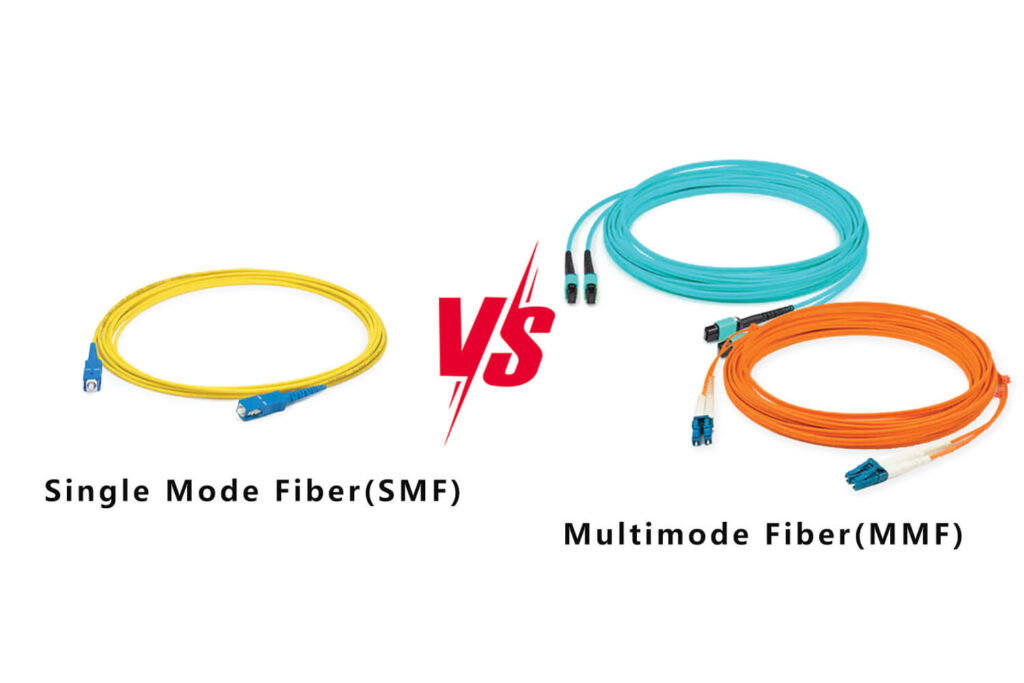
TABLE OF CONTENTS
What Is Single Mode Fiber?
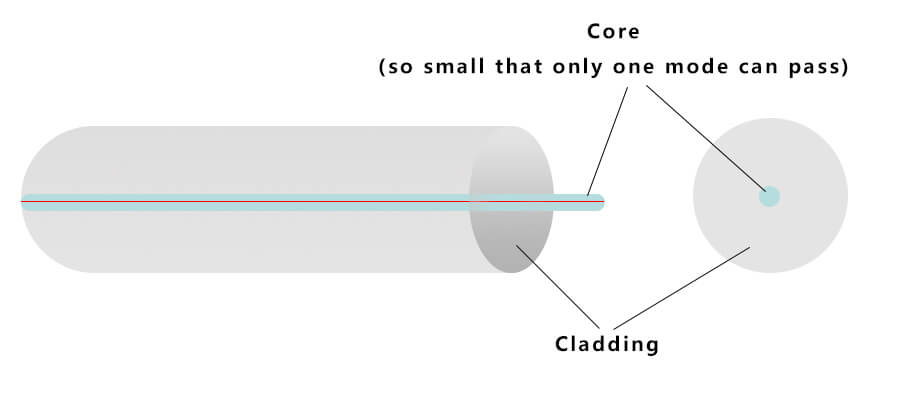
Single mode fiber (SMF) is designed to carry light in a single, narrow path. Think of it as a laser pointer shining straight through a tiny tunnel.
Key Characteristics
- Core size: ~9 µm
- Light source: Laser (DFB/FP lasers)
- Standards: ITU-T G.652D, G.657A1, G.657A2
- Dispersion: No modal dispersion
- Distance: Up to 10–100+ km
- Jacket color: Yellow (standard)
Because the core is extremely small, only one mode of light can travel—which avoids modal dispersion entirely. This is why SMF supports:
- Long-haul telecom
- Metro backbone
- FTTX
- 5G fronthaul/backhaul
- High-speed data center interconnects
Advantages of Single Mode
✔ Longest transmission distance
✔ Highest bandwidth
✔ Lowest attenuation
✔ Future-proof for 40G/100G/400G
Disadvantages
✘ Higher cost transceivers
✘ Requires laser-based optics
✘ Overkill for short indoor links
What Is Multimode Fiber?
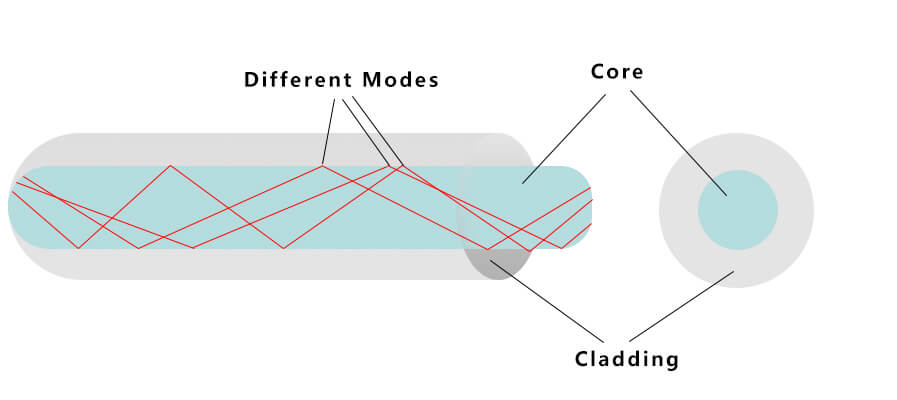
Multimode fiber (MMF) has a much wider core, allowing light to travel through multiple paths simultaneously—like reflections inside a tunnel with many angles.
Key Characteristics
- Core size: 50 µm or 62.5 µm
- Light source: LED or VCSEL
- Standards: OM1 / OM2 / OM3 / OM4 / OM5
- Dispersion: Has modal dispersion
- Distance: Short-range (up to 2 km max, but typically <600 m for high speed)
- Jacket colors: Orange (OM1/OM2), Aqua (OM3/OM4), Lime Green (OM5)
Advantages of Multimode
✔ Much cheaper transceivers
✔ Perfect for short indoor distances
✔ Widely used in enterprise LAN and data rooms
Disadvantages
✘ Limited distance
✘ Lower bandwidth
✘ Multiple standards (OM1–OM5) require correct matching
Single Mode vs Multimode: Key Differences at a Glance
| Feature | Single Mode | Multimode |
|---|---|---|
|
Core Diameter |
~9 µm |
50 or 62.5 µm |
|
Light Source |
Laser |
LED / VCSEL |
|
Distance |
10–100+ km |
<2 km (typically <600 m for high-speed) |
|
Bandwidth |
Highest |
Lower (modal dispersion) |
|
Cost of Transceivers |
Higher |
Lower |
|
Cable Cost |
Lower |
Slightly higher |
|
Typical Use |
Telecom, FTTX, Long-haul |
LAN, Data Rooms, Short Links |
|
Jacket Color |
Yellow |
Orange / Aqua / Lime Green |
Multimode Types: OM1 to OM5 Explained (Full Comparison)
Multimode fiber comes in several types, each optimized for different bandwidth and distance needs. The most common standards are OM1, OM2, OM3, OM4, and OM5.
Here’s a complete comparison:
| Type | Core Size | Bandwidth (MHz·km) | 10G | 40G | 100G |
|---|---|---|---|---|---|
|
OM1 |
62.5 µm |
200 |
33 m |
Not supported |
/ |
|
OM2 |
50 µm |
500 |
82 m |
Not supported |
/ |
|
OM3 |
50 µm |
2000 |
300 m |
100 m |
70–100 m |
|
OM4 |
50 µm |
4700 |
400–550 m |
150 m |
100–150 m |
|
OM5 |
50 µm |
SWDM optimized |
400–600 m |
150 m |
150 m |
Note:
Each multimode type also uses a specific jacket color (e.g., orange for OM1/OM2, aqua for OM3/OM4, lime green for OM5).
You can see the full jacket color coding system here → Fiber Optic Color Code Guide
Distance Comparison: Single Mode vs Multimode (10G/40G/100G)
The following chart shows how far each fiber type can support high-speed transmission:
| Speed | Single Mode | OM3 | OM4 | OM5 |
|---|---|---|---|---|
|
10G |
10 km |
300 m |
400–550 m |
400–600 m |
|
40G |
10 km |
100 m |
150 m |
150 m |
|
100G |
10 km |
70–100 m |
100–150 m |
150 m |
In short:
If your link is longer than 150–600 meters, single mode is almost always the better choice.
Single Mode vs Multimode Cost Comparison
When comparing total system cost—not just cable price—the biggest difference comes from transceivers.
| Component | Single Mode | Multimode |
|---|---|---|
|
Fiber Cable |
✔ Lower cost |
✘ Higher cost |
|
Connectors |
Similar |
Similar |
|
Transceivers |
✘ Higher (laser-based) |
✔ Lower (VCSEL/LED-based) |
|
Total System Cost |
Higher |
Lower |
Conclusion:
The fiber cable itself is cheap. The cost difference mainly comes from the optics used at each end.
Which One Should You Choose? (By Scenario)
Choose Single Mode if:
- Distance exceeds 500 m
- You are building an outdoor, campus, or long-haul network
- Your project involves FTTX, telecom, or backbone links
- You want to future-proof for 40G/100G/400G
Choose Multimode if:
- Your network is inside a data center or building
- Budget is a major concern
- Distance is under 150–600 m
- You want to use low-cost multimode transceivers
Real-World Notes from a Fiber Optic Manufacturer
Based on decades of producing fiber optic connectors, adapters, and patch cords, here are some common issues we see in real installations:
- Many installers confuse OM3 and OM4 because both are aqua, leading to unexpected performance problems.
- Using multimode patch cords on a single mode pathway results in very high loss.
- Older OM1/OM2 systems often fail when upgraded with VCSEL-based 10G optics.
- For indoor networks expected to upgrade to 25G/40G/100G, OM4 or single mode is the safest choice.
- Outdoor applications—especially FTTX—always use single mode fiber.
These practical observations help avoid costly network mistakes.
FAQ
Is single mode always better?
Not always. Single mode supports longer distances and higher bandwidth, but multimode is more cost-effective for short indoor runs.
Can I connect single mode and multimode fiber directly?
No. Their core sizes differ significantly. Connecting them directly causes very high loss unless special mode-conditioning equipment is used.
What fiber type is commonly used in data centers?
For short distances: OM4/OM5
For inter-building connections: Single Mode OS2
Which fiber is better for home or small office networks?
Multimode is typically sufficient for short runs within a building.
Do single mode connectors cost more?
Not significantly. The major cost difference comes from the transceivers.
Can I upgrade multimode networks to higher speeds?
OM3/OM4 can upgrade to 40G/100G.
OM1/OM2 networks generally cannot support high-speed upgrades.
Conclusion
Both single mode and multimode fibers play essential roles in today’s networks. The right choice depends on distance, application, upgrade plans, and budget—not just fiber type.
If you need help choosing the best fiber solution for your application, feel free to reach out anytime. We’re always happy to assist with FTTX, enterprise networking, and data center projects.